
SVG Editor Online
Edit existing SVG elements, line width, opacity and visibility in your browser, with undo and redo. Inspect the result and download the edited SVG.
Processed locally, no upload or login · up to 512 KB / 2,000 elements. Your SVG follows tool navigation in this tab; reloading clears it.
- —
- Paths
- —
- Shapes
- —
- Colors
- —
- File size
Example: edit one SVG element
Only the S path changes to green at 70% opacity. The rounded panel remains intact, demonstrating element-specific editing.
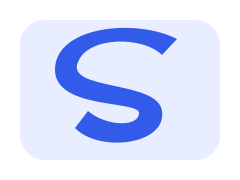
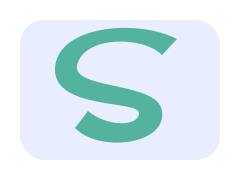
- Parameters used
- Select the second shape; fill #159a77; opacity 0.7; visible.
- What this example does not prove
- This sample edits one element, not a global palette or a full illustration layout.
Self-authored test artwork, processed by the product on 2026-11-19. Not customer work or a guarantee for other inputs. View reproducibility record
What this tool does
Adjust attributes of individual elements in an existing SVG, with undo and redo. Use this page for element-level changes; the separate color tool handles replacing a palette color throughout a document.
Input, output and limits
Static SVG → edited SVG. Up to 512 KB / 2,000 elements, 20 undo steps; no node dragging, pen tool or boolean geometry.
Content reviewed: 2026-11-18 · Testing and known limits
How to use this tool
- 1
Open an SVG file or paste its source, then choose Open in editor.
- 2
Select a shape or group from the element list. Change its fill, stroke, stroke width, opacity or visibility and apply the properties.
- 3
Review the result, undo or redo up to 20 edits, then download the edited SVG.
Common questions
- What can this SVG editor change?
- It changes existing shapes, groups and text attributes: fill, stroke, line width, opacity and visibility. It preserves the document structure instead of tracing the artwork again.
- Can I edit SVG paths or draw new shapes?
- You can edit path commands in the source box and reopen the document, but this editor does not offer pen drawing, draggable nodes or boolean geometry tools.
- Do I need an account, and are SVG files uploaded?
- No account is required for editing and previewing in your browser. Download the result, or explicitly save it to My projects after signing in to the local preview. Temporary drafts are not saved automatically; production project storage is not open.
- When should I use the editor rather than the color changer?
- Use the editor to work on one element, line width, opacity or visibility with undo. To replace a detected color wherever it appears in the SVG, use the dedicated color changer.
A tool for the next step
Create, refine and export your SVG.
Edit
SVG Color Changer
Find solid fill, stroke and gradient-stop colors in an SVG. Replace selected colors, preview the result and download the recolored vector.
Resize SVG
Set SVG width and height in pixels while preserving editable vector source. Lock the aspect ratio or explicitly stretch the drawing, then download SVG.
Crop SVG
Change the SVG viewBox to trim canvas space. Set the crop window or estimate visible bounds, preview the vector result and download locally.